A planner can look beautiful and still fail to support real daily decisions. Functional Planner Stickers turn broad intentions into visible, practical cues. A small appointment sticker can mark a meeting, while a checklist icon can separate tasks from personal notes. This simple distinction reduces visual confusion. It also makes busy pages easier to scan during rushed mornings. After testing different layouts, many users find that consistent symbols save time and mental effort. However, sticker systems work best when they match actual routines, not idealized schedules. A color code may seem helpful until every category receives a different shade.
This guide explains how to choose, place, and review Functional Planner Stickers with greater purpose. You will learn how to combine reminders, deadlines, habits, errands, and priorities without overcrowding a page. The discussion also considers sticker size, writing space, paper quality, and repositionability. These details matter when a planner travels inside a bag or sits beside a coffee cup. Reliable planning requires more than attractive decoration. It requires a repeatable method that can survive changing plans. Still, no method works perfectly every day. Some mornings begin late. Plans shift. That is normal. A useful planner should adapt without making you feel unsuccessful. By observing which stickers you use, ignore, or repeatedly move, you can refine the system honestly. Perhaps the most effective layout is not the prettiest one. It is the one that helps you notice what matters and take the next clear action.
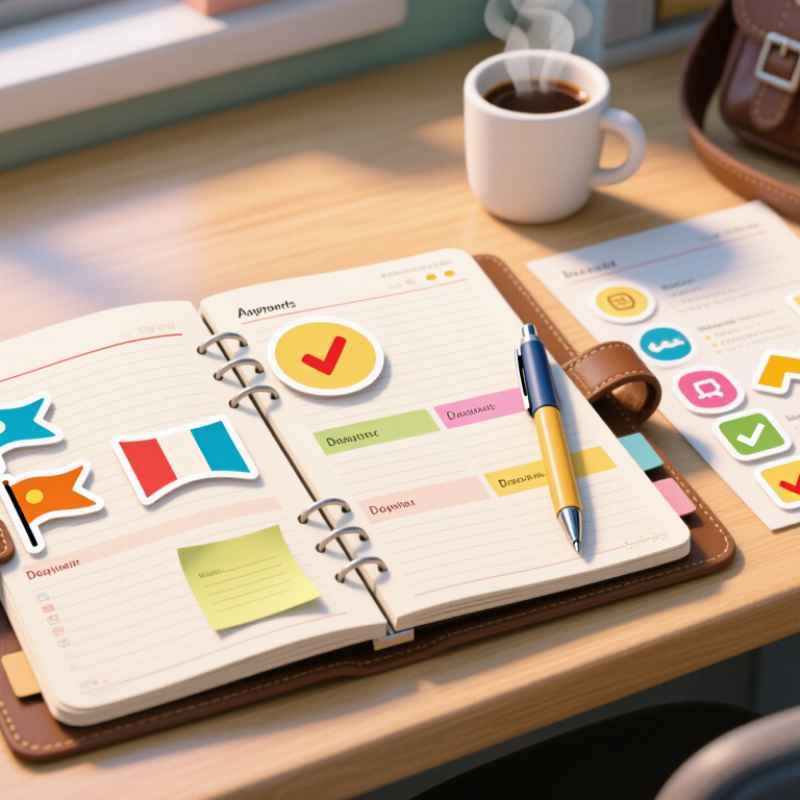
Functional planner stickers work best when each symbol answers a practical question. What must happen, and when?
Habit stickers support repeated actions, such as stretching, reading, or taking a walk. Priority flags draw attention to tasks that cannot quietly disappear. Other types include meal, cleaning, travel, study, and reminder stickers. Their value depends on meaning, not decoration.
I usually place a sticker near the date, then write a short action beside it. A small clock beside “call the clinic” is clearer than a crowded note. Color can separate work, home, and personal plans, but too many colors create visual noise. Keep it simple.
Functional stickers should reduce mental effort. They should not become another collection to manage. Reusable stickers suit changing plans, while writable labels help with unusual tasks.
I have sometimes chosen attractive icons that meant nothing to me later. That mistake taught me to create a small legend inside the planner. Check it weekly. A sticker can also create false confidence when the task remains vague. “Project” is weak; “edit three pages” is measurable. The system works only when the written action stays honest, specific, and easy to find.
Choosing functional planner stickers starts with understanding your planning system, not collecting attractive designs. I tested them in a weekly paper planner with narrow columns. Large appointment stickers quickly hid my writing space. Measure your usable area first. Note whether you plan by hour, task, habit, or project. A sticker should support that structure. If it forces you to change your layout, it may create more friction than order. Good design begins with fit.
Match sticker shapes to recurring information. Small dots work for habits, while slim labels suit deadlines or calls. Use one color family for categories and reserve a stronger color for urgent items. Too many colors blurred my priorities after a busy week. That mistake taught me to limit the palette to three or four tones. Check the adhesive and paper compatibility, too. A sticker that lifts overnight can make a carefully planned page unreliable. Test one sheet before committing.
Your planning method may change during busy seasons. Keep flexible stickers for moved meetings, postponed tasks, and unfinished work. Transparent styles can preserve handwritten notes, but they may reduce readability on dark ink. I still sometimes place stickers too early and regret losing space for unexpected tasks. Leave a small margin. Review the page after several days, then adjust size, color, and placement based on actual use rather than imagined perfection.
Choose stickers that match the time scale of your planning system. Use compact appointment and task stickers for short horizons, while habit, goal, and review stickers work better across longer planning periods.
Functional planner stickers work best when they are easy to find, not merely attractive on a page. I keep appointment, task, meal, finance, and reminder stickers in separate sections.
A small accordion case fits beside my planner and prevents loose sheets from curling. Each section has a simple label, such as “Calls” or “Deadlines.” Clear labels save time.
I place frequently used stickers near the front. Less common designs stay in a rear pocket. This arrangement matches my weekly routine and reduces unnecessary searching.
Before planning on Sunday evening, I check the next seven days and move likely stickers into a slim, temporary sleeve. It holds only a few pieces. That limit keeps my desk calm.
Size also matters. Tiny dots suit repeated habits, while larger blocks need space beside written details. I avoid mixing both types in one narrow compartment. The difference becomes obvious when I plan quickly.
One problem remains: I sometimes organize stickers too carefully and delay planning itself. A beautiful system can become another task. Every month, I remove unused categories and adjust the sections after noticing real habits. For example, a rarely used “Travel” pocket may become a “Follow-up” pocket during a busy season. This small review keeps access practical rather than permanent.
How to Use Functional Planner Stickers Effectively?
Functional planner stickers work best when each one has a clear job. Use small task stickers for errands, calls, deadlines, and household work. Place an appointment sticker beside the exact time, not randomly in the page margin. This keeps the schedule readable during a busy morning. I prefer one color for work tasks and another for personal events. Too many colors become distracting.
For habits, place a repeatable sticker near the day’s date. A water glass, walking symbol, or book icon can mark a simple daily action. Add a small check mark after completing it. If the habit takes several weeks, use a weekly row instead of filling every calendar box. This reduces visual pressure. Keep the system honest. A decorative sticker should not pretend that a task is finished.
My first layout failed because I added stickers before checking the week’s workload. The pages looked cheerful, but important deadlines disappeared among bright shapes. Now, I review Monday morning and move flexible tasks to open spaces. I also leave a little blank room for unexpected work. That part matters. A planner must reflect real behavior, not an ideal routine. If a sticker remains unused for three days, I question its purpose and change the system rather than blaming myself.
| Sticker Category | Primary Purpose | Recommended Placement | Information to Record | Suggested Review | Practical Example |
|---|---|---|---|---|---|
| Task Sticker | Identify a specific action that needs completion. | Place it beside the intended date or time block. | Action, deadline, priority, and completion status. | At the start and end of each planning day. | “Submit project outline” with a Friday deadline. |
| Event Sticker | Mark appointments, meetings, travel, and fixed commitments. | Use on the exact calendar date and, when possible, the time slot. | Event name, start time, location, and preparation needs. | Check the upcoming week every weekend. | “Dentist — 3:00 p.m.” with a reminder to bring records. |
| Habit Sticker | Make a repeated behavior visible and easy to review. | Create a row or column for each day of the week. | Habit name and a simple completed/not-completed mark. | Record immediately after the behavior occurs. | “Drink water” checked once the daily target is reached. |
| Deadline Sticker | Highlight a date by which an important result must be delivered. | Place on the deadline and add an earlier preparation marker. | Final due date, deliverable, and next preparation step. | Review twice: one week before and one day before. | “Renew document” due on the last day of the month. |
| Reminder Sticker | Prompt a small action that could otherwise be forgotten. | Place near the relevant date, object, or page section. | Short prompt, trigger, and preferred completion time. | Review during the daily setup routine. | “Pack lunch” placed on the evening planning section. |
| Priority Sticker | Separate urgent or high-impact items from routine work. | Attach to the most important task of the day. | Reason for priority and the next concrete action. | Reassess when priorities or deadlines change. | “High priority: send revised budget for approval.” |
| Meal or Wellness Sticker | Track planned meals, exercise, sleep, or recovery activities. | Use in a weekly wellness or routine section. | Activity, approximate duration, and completion mark. | Summarize patterns at the end of each week. | “Walk — 30 minutes” scheduled for Tuesday evening. |
| Review Sticker | Create a consistent point for evaluating progress and adjusting plans. | Place at the end of a day, week, or month. | Completed items, unfinished items, obstacles, and next priorities. | Use at the selected review interval without skipping it. | “Weekly review: move unfinished tasks and plan next week.” |
Functional stickers work best when they support decisions, not simply decorate empty spaces. Use one symbol for appointments, another for deadlines, and a third for recurring habits. Keep the system visually simple. During my weekly review, I check whether each sticker helped me act at the right time. If a deadline sticker stayed unnoticed, its color or placement needs changing. The problem may be my layout, not the sticker.
I also compare planned tasks with completed tasks. A crowded page can reveal unrealistic scheduling. Last month, I placed stickers for six major tasks across one busy week. It looked organized, but the plan was impossible. I now leave blank space for delays, phone calls, and low-energy days. That adjustment feels less productive visually, yet it reflects real working conditions. A reliable planning method should describe your life honestly, including mistakes.
Tips: Place action stickers near the time or day they matter. Limit each category to one clear shape or color. Review unused stickers every week and remove categories that create noise. Test one change for seven days before redesigning the whole system. Take a quick photo of your weekly spread, then compare it with your actual behavior. This evidence can expose habits that memory hides. Avoid changing the system after one disappointing day; some failures come from poor timing, not poor planning.
Measure the usable writing area before buying stickers. Narrow columns need small dots or slim labels. Match stickers to hours, tasks, habits, or projects. If a sticker covers your notes, it creates more work.
Use dots for habits and slim labels for calls or deadlines. Place appointment stickers beside the exact time. Use simple symbols for recurring actions. Keep each shape linked to one clear job.
Three or four colors usually keep priorities visible. Reserve the strongest color for urgent items. Use one color family for related categories. Too many bright colors blurred my weekly priorities.
Review the week before placing large stickers. Leave a small blank margin for unexpected tasks. Put action stickers near the day or time they matter. I still place some too early.
Transparent stickers can preserve handwritten notes underneath. However, dark ink may become difficult to read. Test one sticker on your actual paper first. The result may disappoint you.
Place a repeatable symbol near each date. A water glass, walking icon, or book can mark one daily action. Add a check mark after completion. Do not let decoration pretend that work is finished.
Keep flexible stickers for postponed tasks and moved meetings. Move them into open spaces during your weekly review. Leave room for delays and low-energy days. A perfect page is not always useful.
Compare planned tasks with completed tasks each week. Review unused stickers after three days. Change the size, color, or placement if they remain unnoticed. Test one adjustment for seven days. My crowded pages still teach me something.
Functional Planner Stickers can make planning clearer, faster, and more engaging when used with purpose. Start by understanding the different roles stickers can serve, such as marking appointments, highlighting priorities, tracking habits, noting deadlines, or adding reminders. Choose designs that fit your planning system, whether you use a daily, weekly, or monthly layout, and select sizes and colors that are easy to recognize without overcrowding the page. A simple organization method, such as sorting stickers by function or storing frequently used ones in an accessible place, can save time and keep your planning routine consistent.
Use the stickers to create visible cues for tasks, events, and habits, placing them where they support quick decision-making. Avoid decorating without a planning goal; each sticker should add useful information or motivation. At the end of each week or month, review which stickers helped you stay organized and which were unnecessary. Adjust your categories, placement, and system so your sticker-based planning method remains practical, flexible, and suited to your changing needs.